




There are few homeowner problems as suddenly annoying as realizing your access system is failing you. A quick trip outside turns into a frustrating delay when the buttons on your wireless unit fail to register. When a garage door opener is working fine from the inside, but the exterior keypad is unresponsive, the solution is usually simpler than you think, but it needs to be precise.
Understanding how to Fix Garage Door Keypad issues involves diagnosing power problems, radio frequency interference, and programming errors. Modern garage doors rely on small, often temperamental wireless components. Knowing the proper steps to address an access issue can save you a service call and get you back into your home quickly. This comprehensive guide details the common causes of failure, steps for Reprogramming Keypad codes, and how to tackle the frustrating Keypad Locked Out message without risking damage to the opener. To understand how keypad failure relates to other system breakdowns, review our guide on common garage door problems.
The Immediate Checklist: When the Keypad Isn’t Working
Before panicking and immediately calling for service, run through this rapid diagnostic checklist.
Rapid Troubleshooting Steps:
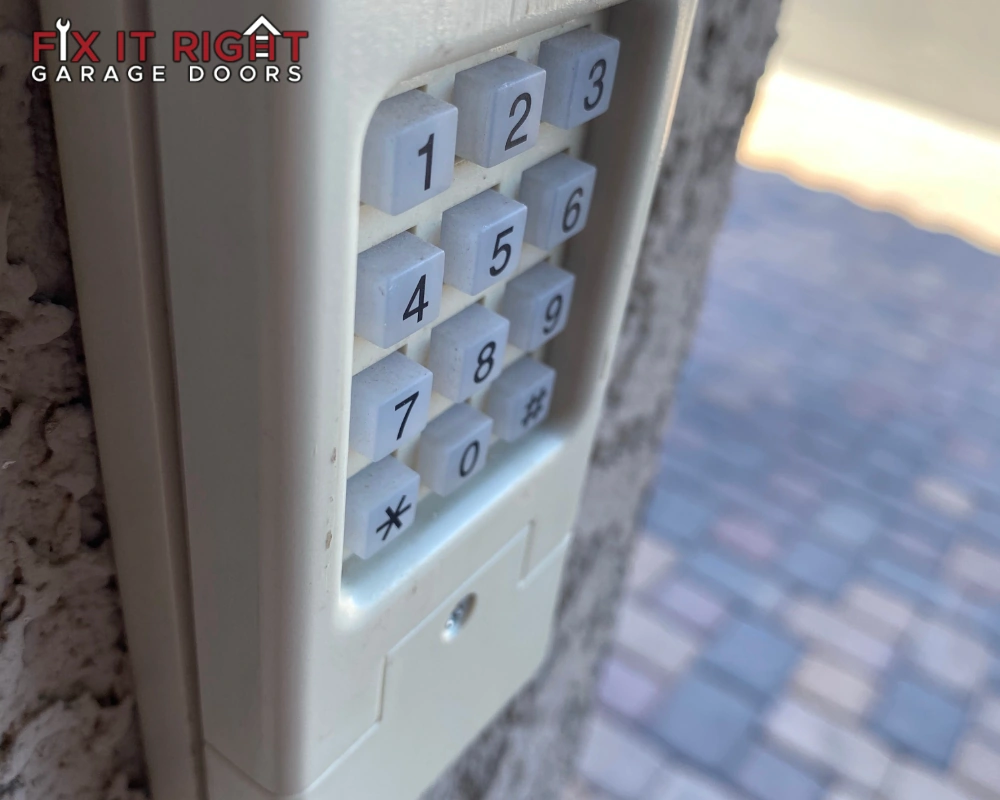
- Check the Light: Does the keypad light up when you press a button? If not, the most likely culprit is the power source.
- Use the Remote: Does your handheld remote work from the same location? If the remote works, the problem is isolated to the exterior unit, likely the battery or signal strength. If the remote also fails, the issue may be the opener’s receiver.
- Check the Wire: For older, wired units, check for visible damage where the wire enters the wall.
- Try the Default Code: If you recently had a power outage, the unit may require a hard reset procedure for code input.
The core of learning how to resolve these access issues is ruling out the most straightforward power and communication failures before diving into the complex programming steps.
Cause 1: Dead Batteries (The Most Common Cause)
The single most frequent reason you need to regain access is a dead or low Garage Door Keypad Battery. These batteries are subjected to extreme temperature fluctuations that accelerate their failure rate.
How to Address the Garage Door Keypad Battery:
- Location: The battery compartment is usually located behind a small protective cover.
- Replacement: Always replace the Garage Door Keypad Battery with a high-quality alkaline battery of the correct voltage.
- Reset: After replacing the Garage Door Keypad Battery, the unit may require a brief period to boot up. Test the unit immediately. If it still shows the unresponsive symptom, proceed to the reset or programming procedure.
Pro Tip: Change your unit’s battery every 1-2 years, ideally before the cold Canadian winter hits.
Cause 2: Reprogramming Keypad Codes and Synchronization Issues
The second major cause for an unresponsive keypad is a loss of synchronization between the unit and the garage door opener’s receiver. This requires setting the access codes again.
Steps for Reprogramming Keypad Access (General Guidelines):
The specific steps for Reprogramming Keypad access vary significantly by brand. However, the core process involves these steps:
- Access the Learn Button: Locate the “Learn” button on the motor head unit.
- Activate Learning Mode: Press and release the Learn button. An LED light will illuminate, indicating you have about 30 seconds to initiate the code sequence on the unit.
- Enter New Code on Keypad: Enter your desired new 4-digit code.
- Confirmation: The garage door opener light will usually flash once or twice, indicating that the new code sequence was successful.
If the door still fails to respond, the issue might be a Keypad Locked Out situation or a deeper hardware fault.
Cause 3: The Keypad Locked Out Error and Hard Resets
Repeatedly entering the wrong code can trigger an internal lock-out feature designed for security. This results in the frustrating Keypad Locked Out message.
Clearing the Keypad Locked Out State:
- Wait Period: Some older units simply require a “cool-down” period of 10-15 minutes before the lock-out state clears.
- Hard Reset (Power Cycle): If the Keypad Locked Out persists, try disconnecting power to the garage door opener completely for 60 seconds, and then restore power. This can clear the memory and reset the lock-out timer.
- Factory Reset: If you are still struggling to restore access, some models allow a full factory reset. This will erase ALL saved codes and remotes, necessitating a full code setup sequence for every device.
If the problem is a persistent lockout, you may need assistance.
Cause 4: Weather, Interference, and Signal Failure
The wireless signal between your keypad and the opener can be disrupted by external factors, especially in the Canadian climate.
Interference and Weather Checklist
| Issue | Description | Fix or Mitigation |
| Extreme Cold | Low temperatures drastically reduce the chemical efficiency of the battery, weakening the signal. | Use specialized lithium batteries for better cold performance. Replace the unit’s battery every fall. |
| Radio Interference | New LED light bulbs, smart home devices, or government towers can interfere with the signal. | Check for new electronic devices installed near the opener unit. Use code setting steps to try a different frequency slot. |
| Signal Obstruction | Metal siding or large vehicles parked in front of the door can block the wireless signal. | Reposition the unit slightly higher or ensure the antenna wire on the opener unit is hanging straight down. |
| Water Damage | Degraded seals can allow moisture to reach the electronics. | Inspect the seal immediately. If corrosion is visible, the unit likely needs replacement. |
Advanced Troubleshooting: Keypad Sequences for Different Brands
When a simple battery swap fails, you must follow the correct code sequence for your specific brand.
General Keypad Sequences by Brand
| Brand (Manufacturer) | General Reprogramming Keypad Steps | Common Locked Out Indicator |
| LiftMaster / Chamberlain | Press Learn button on the motor head, then enter your code on the keypad, followed by ENTER/PROG button. | Unit lights up, but door does not move. |
| Genie | Press the Learn button twice, then enter the code on the keypad, followed by the UP/DOWN button. | Opener light flashes rapidly, or the keypad shows Keypad Locked Out after multiple tries. |
| Craftsman | Follows the Chamberlain/LiftMaster sequence (same technology). Must be within 30 seconds of pressing the Learn button. | Keypad beeps constantly but does not open the door. |
| Marantec | Uses a dedicated “Program” button on the motor head. After pressing it, enter your old code, then the new code twice on the keypad. | Keypad display is blank, requiring immediate battery replacement before attempting a code reset. |
Attempting to reset the code without knowing your model’s exact sequence can inadvertently activate a lock-out mode. If in doubt, refer to your opener’s user manual or contact a professional for Emergency Garage Door Service. You can also consult our internal guide on keypad reprograming.
Cause 5: The Opener Receiver is the Real Problem
If both the remote and the keypad are unresponsive simultaneously, the culprit is almost certainly the motor head unit’s logic board or receiver. This is the one scenario where you need expert intervention, as a bad board is not something you can easily repair.
To prevent surge damage to the opener board… consider plugging the motor unit into a high-quality surge protector. This simple, affordable step can save you the cost of an entirely new opener. When selecting electrical accessories for your garage, always look for independent certification marks (like the UL Solutions in Canada mark) to ensure product safety and compliance, as detailed on their website https://canada.ul.com/
When to Clear All Codes (The Nuclear Option)
If you’ve tried all the code setting steps, replaced the battery, and are still dealing with a persistent non-working keypad, you might need to completely wipe the opener’s memory.
How to Clear All Codes:
- Press and HOLD the Learn Button: Unlike the quick press for code setting, you must press and hold the Learn button for 6 to 10 seconds.
- Wait for Light: The LED light on the motor head will turn off, indicating that all codes have been permanently erased.
- Reprogram Everything: You must now individually follow the Reprogramming Keypad steps for your specific opener model, and repeat the process for every remote control and vehicle integration system.
This step will certainly eliminate any confusion or lingering Keypad Locked Out states but is a commitment. This should be your last step before calling for professional Emergency Garage Door Service.
Advanced Keypad Safety: Preventing Keypad Locked Out Situations
Preventing a Keypad Locked Out situation is far easier than trying to get the unit working again after the fact. Most lockouts occur due to multiple failed entry attempts.
Keypad Security and Maintenance Tips
| Action | Purpose & Benefit | Secondary Keyword Relevance |
| Regular Cleaning | Wipe the keys with a soft, dry cloth. Dust buildup can make keys stick or register multiple presses, leading to a lock-out error. | Prevents access failure due to dirty contacts. |
| Code Confirmation | After programming, always press the button twice to ensure the code is saved correctly. | Confirms proper code sequence execution. |
| Yearly Battery Swap | Replace the battery annually before the cold shifts to ensure peak signal strength. | Avoids access issues and improves signal reliability. |
| Avoid Repeated Errors | If the code fails once, stop and wait 15 seconds. Do not mash the buttons, as this triggers the security feature. | Prevents the Keypad Locked Out security feature activation. |
When to Call for Emergency Garage Door Service
Knowing when to stop trying to Fix Garage Door Keypad access yourself and call a professional for Emergency Garage Door Service is crucial for safety and efficiency.
You should seek professional help immediately if:
- Total Power Failure: The motor head unit is completely dead (no lights, sounds) despite checking the circuit breaker.
- No Response to Reprogramming Keypad: You have successfully replaced the battery and followed the correct manufacturer steps multiple times, yet the door remains unresponsive.
- Physical Damage: The unit is cracked, corroded, or the buttons are physically stuck.
- Persistent Keypad Locked Out: The security feature is constantly activating, even after following the power cycle reset steps.
Professional technicians have specialized diagnostic tools to check the signal strength and confirm whether the receiver on the opener unit is faulty or if the problem lies solely with the keypad.
For more information on the comprehensive repair options and components of your garage door system, review our guide on garage door installation and types.
Protecting Your Keypad from the Canadian Climate
The harsh Canadian climate is particularly hard on garage door electronics. Temperature swings can cause components to contract and expand, weakening battery connections and seals.
To keep your wireless system operating smoothly and avoid constant issues:
- Seal Inspection: Periodically check the rubber seal around the keypad housing.
- Lithium Batteries: While more expensive, lithium batteries offer superior performance in cold weather compared to alkaline.
- Preventive Replacement: If your keypad is over 5 years old, consider proactively replacing the unit. Newer keypads often have better weather sealing and stronger signals.
Staying ahead of the weather is key to avoiding an Emergency Garage Door Service call for a simple, preventable problem.
Conclusion: Don’t Let Your Keypad Not Working Frustrate You
A non-functional keypad is a frequent but solvable issue. Most problems stem from a dead battery or a simple synchronization failure. However, if you are struggling with a persistent Keypad Locked Out error or suspect the receiver in the motor head is the culprit, it is time to call for professional Emergency Garage Door Service. Never attempt to bypass a safety or lock-out feature with force. By following these 9 steps, you can confidently Fix Garage Door Keypad problems and maintain secure access to your home.
Always ensure the safety of your system. You can consult the Public Health Agency of Canada’s guidelines on injury prevention. Furthermore, the Door and Access Systems Manufacturers Association (DASMA) provides excellent safety tips for consumers.
Need immediate assistance? Visit our page Fix It Right Garage Doors.